Studio ingest
Turn an editorial timeline or a single VFX plate directly into encode jobs, with no per-shot job creation and no per-shot preset selection.
An editor exports a timeline, an artist submits a shot by hand, or a production-tracking event fires. All three converge on the same compiler, so every shot receives identical chunking, scheduling and correctness treatment regardless of how it entered.
This page covers the ingest surface itself. The sequence handling underneath it is described on Image sequences & VFX.
Entry points#
Every shot enters through one of three entry points, each mapping to exactly one inbound route:
| Entry point | Who uses it |
|---|---|
native_conform | An operator or a script submitting shot fields directly, one call per batch. |
hiero_export | An editor's Hiero timeline export, uploaded as a file. |
flow_trigger | A production-tracking event driving ingest with no operator action. |
A fresh install accepts work only through native_conform. The Hiero and tracking-trigger entry points each require explicit opt-in from an administrator.
Submitting to a disabled entry point returns a refusal naming the entry point that is disabled. If an import does not appear, check the entry-point admin on the Ingest page before investigating further.
Ingest profiles#
An ingest profile is a project's ingest policy: the defaults every shot from that project inherits, so settings are not re-specified per shot. Administrators build one through a five-step wizard, reached from the Projects hub; the retired /admin/ingest-profiles route redirects there. How a profile is assigned to a project — the shared pool and per-integration binding — is described on the same page.
The wizard's five steps — handles, OCIO and colour, the EXR codec, the QuickTime/JPEG preset bundle, and slate and burn-in templates — are documented step by step on Projects. The colour step also sets the three output-root templates that determine where the master, the dailies and the reference deliverables land.
If all three output-root templates are left at their shipped defaults, two projects that share a shot code will overwrite each other's output. The templates accept shot and version placeholders to prevent this. The wizard warns until at least one template is changed; do not dismiss the warning.
Two limits apply when building a profile: the preset dropdowns are a fixed list of the shipped ingest presets rather than a live read of the full preset library, and the EXR codec dropdown surfaces six of the available compression schemes.
Job fan-out per shot#
Every entry point reduces its input to a plain list of shot requests, and one compiler turns each request into jobs. This single hand-off guarantees that a Hiero import, a manually entered shot and a triggered event receive identical treatment.
For a shot backed by an image sequence, one request becomes:
- One working master— colour-managed, in the profile's chosen EXR codec.
- One dailies job — Rec.709 review frames for the edit department, if the profile sets a dailies preset.
- One reference job per checked preset — ProRes deliverables, carrying slate and burn-in context where a template is set.
The dailies and reference jobs depend on the master: their chunks do not start until the master finishes. If the master fails, its dependents are cancelled rather than remaining queued indefinitely. After a single submission, the queue shows a master with its derivatives waiting behind it.
A single-file movie clip is not a plate, so the compiler submits exactly one ordinary job against the profile's movie preset. If no movie preset is set, the clip is skipped and logged with a named reason rather than dropped silently.
Run an ingest#
The operator surface is the Ingest page at /ingest: a one-click form for a single shot. Select the project — the form loads its default ingest profile as soon as one is chosen — then enter the shot's fields and submit. If the project has no default profile linked, the form returns an explicit refusal. Submitting requires operator access; a viewer can observe but cannot submit.
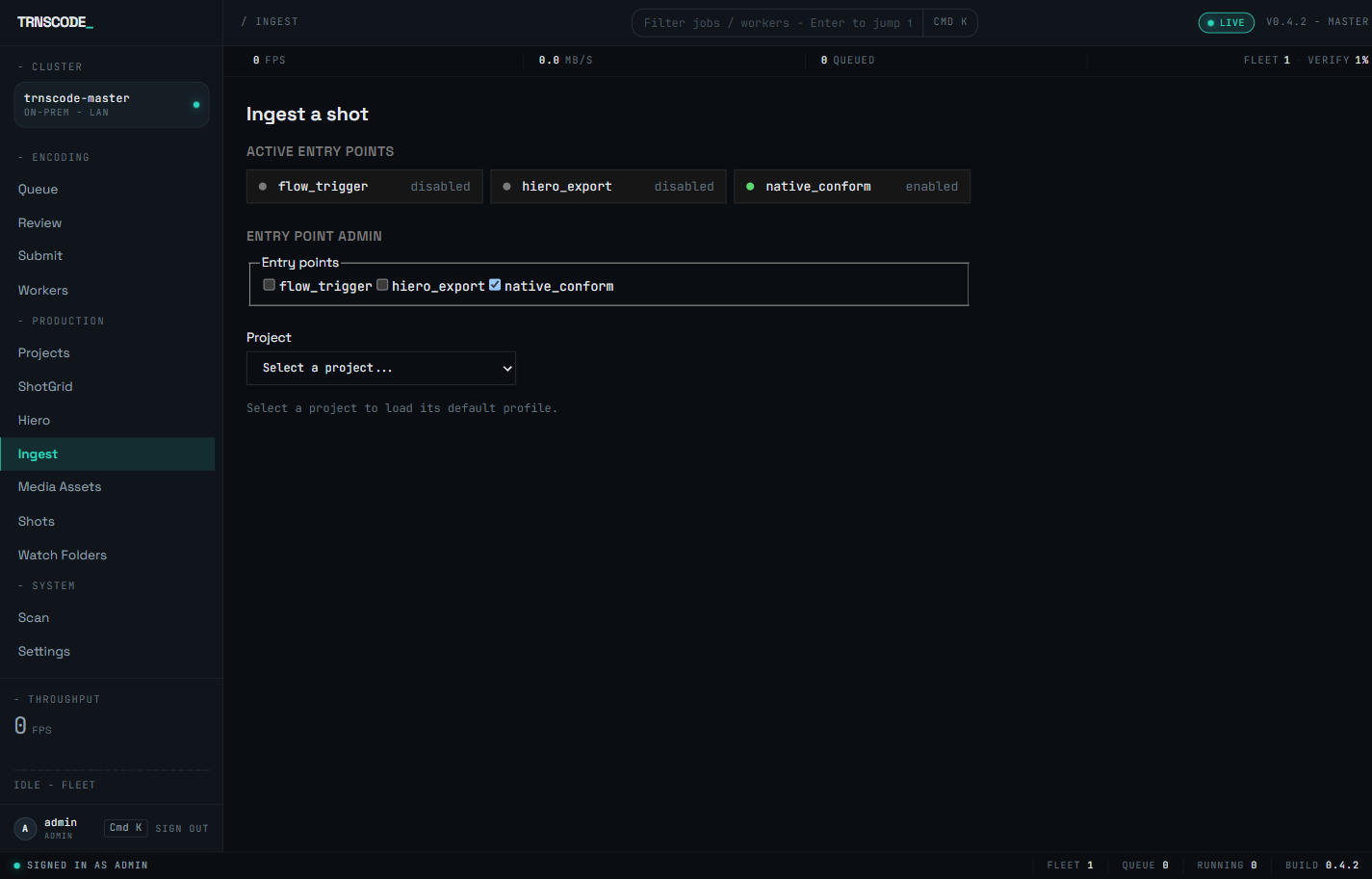
A status row at the top of the page shows which of the three entry points are enabled, and administrators toggle them from the entry-point admin directly beneath it. The state of each entry point is therefore visible before submission.
The timeline path lives on the dedicated Hiero page: pick a project and upload the Hiero OTIO export, and every clip carrying a sequence or a movie reference becomes its own shot request, all compiled together.
The third path requires no operator: a tracking event resolves the project and profile and calls the same compiler internally.
Shots and versions#
Every submitted job is recorded against a shot and a shot version. Version numbers increment per shot automatically, unless the clip name already carries a version suffix; the suffix is used rather than overridden.
Re-submitting the same timeline, or a repeated tracking event, is recognised as a replay: the original ingest request is returned rather than a duplicate set of jobs created. This makes retries safe.
Browse the shot domain on the Shots page at /shots: the shots themselves, the versions each one carries, and the history and status of every ingest request.
Preconditions and limitations#
The master, its dailies and its reference jobs can land on different workers, and there is no per-chunk transfer for sequence frames. Every worker that might pick one of these jobs up must see the same frame directory at the same path.
This is a deployment precondition; the scheduler does not work around it. Point output roots at storage every worker can reach, or ingest jobs will fail on any machine that cannot see the frames.
Burn-in and slate rendering is a separate concern. The wizard selects which templates a job carries; how the templates render onto the picture is documented on Burn-in & slate.