Planning and managing your fleet
Three supported arrangements — one machine, a small group on a home network, and a facility on a wired VLAN — and the console pages that watch and drive the fleet once it exists. The software is identical in all three.
There is no separate edition for small deployments. Adding machines increases throughput. What changes with scale is not the software but the surrounding decisions: where the media is stored, how the network is arranged, and how enrollment is controlled.
This page covers both halves. The first is planning: the three arrangements, hardware encoders, storage, and where throughput stops scaling. The second is management: the Workersgrid, the per-worker detail page, and the administrator's control rail in the web console.
One machine#
Run the master and one worker on the same computer. This is a complete, supported configuration, not a degraded one.
Chunked parallel encoding still applies: the source is split, and the worker processes chunks using the cores available to it. The gain over a single FFmpeg process comes from parallelism the encoder cannot extract on its own, particularly on codecs that do not scale well across many threads.
In this arrangement no media is copied. A worker on the same machine reads the source directly from disk, so there is no transfer cost.
Set up one machine first even when a larger fleet is planned. When a second machine is added, the network is then the only new element to verify. The resulting configuration does not change.
Home and small-office networks#
In the common arrangement, a desktop that remains powered on runs the master service, and two or three other machines run workers. Typical contributors are a retired workstation, a second desktop that is idle overnight, or a former render machine.
- Run the master on the machine that is powered on most often, not the fastest one. A worker that disappears costs one chunk; a master that disappears takes the queue with it.
- Connect every machine by ethernet. The master refuses workers on Wi-Fi by default; admitting them requires an explicit override. See Allowing non-wired workers.
- Workers discover the master automatically on a flat network. If the machines are on different subnets, or a managed switch blocks discovery, set each worker's master address directly.
A machine that sleeps causes more delay than a machine that is off. When a worker sleeps mid-chunk, the master waits until the timeout elapses before the chunk is reassigned. Disable sleep on every machine that contributes to the fleet.
A facility#
At facility scale the software is unchanged; three operational decisions become significant.
Set an enrollment token on the master and distribute it to each worker. Without one, any machine that can reach the port may register and wait for approval. On a network with contractors, freelancers and personal laptops, open enrollment produces a queue of unknown machines rather than a security incident; close it regardless.
Approval is the human control point before a machine encodes. The holder of the administrator account owns it. At scale, assign approval to one named person rather than leaving it to whoever notices first.
With a handful of machines, transfer cost is tolerable. Across dozens it dominates. See Storage arrangement below.
Hardware encoders#
GPUs are detected at registration with no configuration. NVIDIA, Intel Quick Sync, AMD and Apple VideoToolbox are all probed, and a mixed fleet of GPU and CPU machines is normal.
Scheduling determines how the hardware behaves under load. A card supports a limited number of simultaneous encode sessions — more on datacentre hardware, fewer on consumer and laptop parts. Each worker advertises its budget, and the scheduler holds a token per session, so a job that requires a GPU waits for a free slot rather than being assigned to a card that is already saturated.
A machine with one consumer GPU is therefore not equivalent to a machine with a datacentre card, even when both report a GPU. The session count can be raised or lowered per model when the default does not match what the hardware sustains.
Storage arrangement#
The storage arrangement determines the throughput ceiling more than processor count does.
| Arrangement | What happens | Suits |
|---|---|---|
| Shared volume, same path everywhere | Workers read the source directly. Nothing is copied over the network. | Any fleet past two or three machines |
| No shared storage | The master serves each worker the bytes its chunk needs and takes the encoded result back. | Small fleets, mixed machines, anything temporary |
The second arrangement is fully supported and is what makes a five-minute setup possible. It is also the first limit on scaling: every chunk crosses the network twice, and the master becomes the bottleneck long before the workers do.
A path is shared only when it resolves to the same file on every machine. A drive mapped to Z: on one machine and mounted at /mnt/media on another is two paths, not one. Use a form that every machine resolves identically.
Throughput limits#
Adding machines stops increasing throughput at some point. In approximately the order encountered:
- The tail chunk. A job is not finished until its slowest chunk is. One machine much slower than the rest sets the finish time regardless of how many fast machines are added.
- Chunk count. A short source does not divide into enough chunks to occupy a large fleet. At twelve seconds per chunk, a two-minute clip yields about ten units of work; six machines will not outperform three on it.
- Transfer, when storage is not shared. High-bitrate sources can take longer to move than to encode.
- Assembly. Joining, muxing and verifying happen on the master, single-threaded relative to the fleet. On long sources this is measurable time that additional workers do not reduce.
Distribution therefore yields the most on long sources and expensive codecs. On a thirty-second clip in an inexpensive codec, coordination costs more than it saves.
The Workers page#
Once machines are enrolled, the console's Workerspage is where the fleet is watched. It presents one card per machine: the worker's name and status, its operating system and GPU, live CPU, RAM and GPU utilisation, free disk space, its active-encode count and current fps, and the saved values that govern it — CPU cap, concurrency and weight.
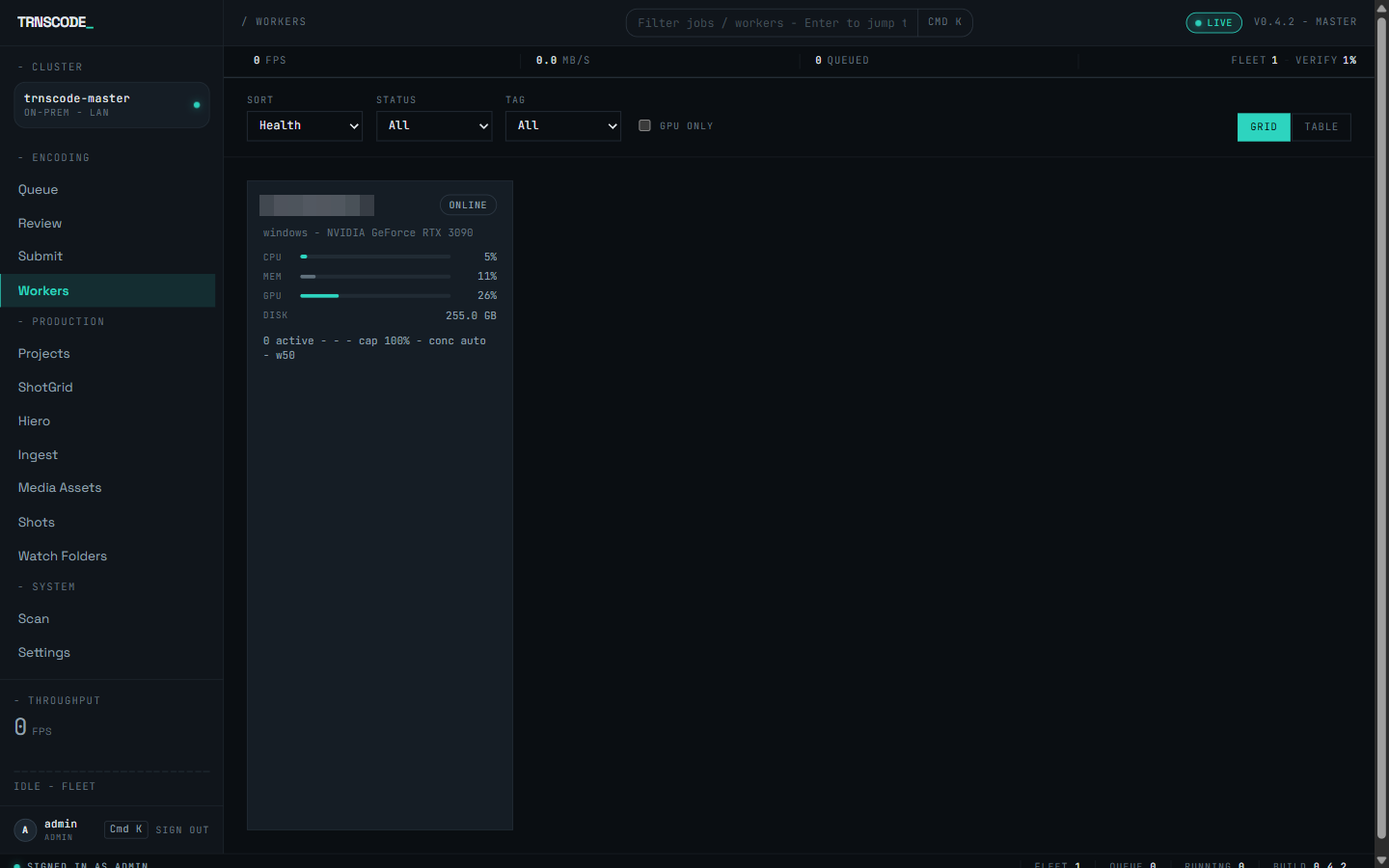
The grid sorts by health by default and filters by status and tag, with a GPU-only toggle for jobs that need hardware encoders; the filter field in the top strip narrows the grid by free text. A table view remains available and shows the same fleet as sortable columns, which reads better past a few dozen machines.
Enrollment is unchanged: a newly registered machine appears on this page first as pending approval and takes no work until an administrator approves it. See How-to: Approve a worker.
Worker detail#
Selecting a card opens the worker's own page. The header identifies the machine — worker ID, operating system and architecture, CPU model and core count, bundled FFmpeg version, and every encoder it advertises, which is the manifest the scheduler matches chunks against — followed by its weight, tags and last heartbeat. Live resource tiles show CPU, memory, GPU and free disk.
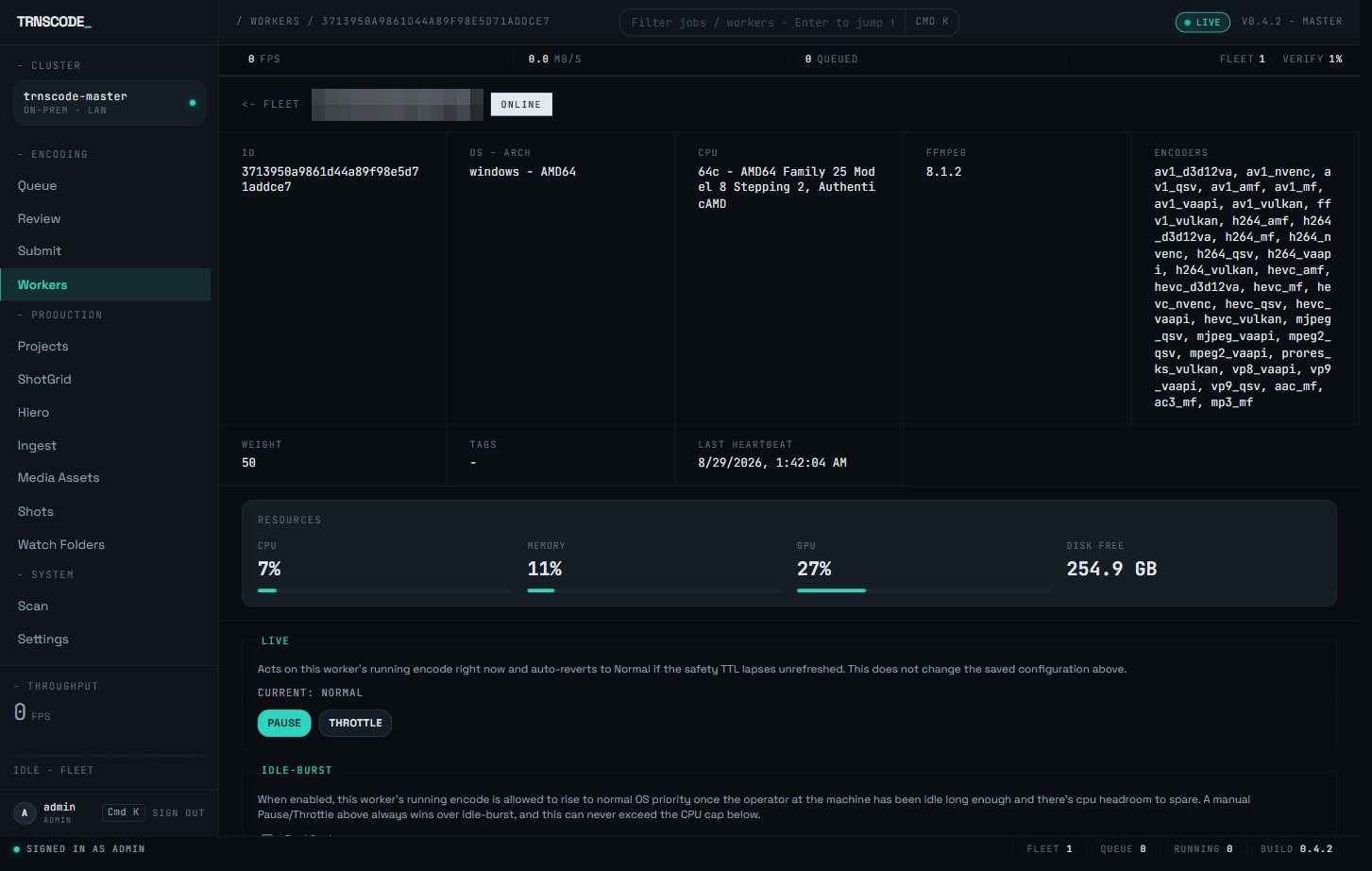
Below the tiles, the page keeps a per-minute history chart of the same readings, a live table of the encode processes currently running on the machine, the chunks it recently completed, and its live throughput. When a job is slow, this page shows whether the machine is saturated, starved or idle.
The admin control rail#
Everything below the telemetry is the control rail. It requires an administrator account; every other account sees the page read-only.
Live pause and throttle
The Live control acts on the encode running on the worker at this moment. Three states are available: Normal, Throttled and Paused. Throttled keeps the encode running at reduced intensity; Paused holds it entirely. Neither cancels the work — the encode is held, not killed, and proceeds from where it stopped when the state returns to Normal.
The live state is not saved configuration. The console holding it refreshes a safety hold, and if the hold lapses — browser closed, network dropped — the worker reverts to Normal on its own. A disconnected console cannot leave a machine paused indefinitely; for anything that must persist, use the saved settings below.
Idle-burst
Idle-burst suits a worker that is also somebody's workstation. When enabled, the encode runs gently while a person is at the machine and rises to full speed once the machine has been idle long enough and there is CPU headroom to spare. A manual pause or throttle always overrides idle-burst, and idle-burst never exceeds the CPU cap.
Saved settings
The remaining controls persist on the worker and survive restarts.
| Setting | Effect |
|---|---|
| Weight | Biases chunk assignment toward or away from this machine relative to the rest of the fleet. The default is 50. |
| Concurrency cap | The maximum number of simultaneous encodes the worker runs. The default derives it from the hardware automatically. |
| CPU cap | Caps the encoder's thread footprint below full CPU. See Sharing a machine below. |
| Schedule window | Restricts the hours during which the worker accepts new chunks. Outside the window, in-flight work finishes and nothing new is assigned. |
| Tags | Labels attached to the worker. The fleet grid's tag filter selects on them. |
Sharing a machine#
A worker can be capped below full CPU. The cap limits the encoder's thread footprint rather than deprioritising it, which makes it practical to run a worker on a machine that is also used for editing. The default leaves the encode uncapped, so set the cap explicitly — it is a saved setting in the control rail — on any shared machine.
Idle-burst is the other half of the same arrangement: full encode speed only while nobody is using the machine. A schedule window restricts the worker further, to fixed hours — overnight only on a shared workstation, for example.
Lifecycle actions#
Four lifecycle actions close the control rail.
| Action | Effect |
|---|---|
| Drain | Stops new chunks being assigned while in-flight work finishes. Use it before shutting a machine down. |
| Remove | Deletes the worker from the fleet. A removed machine that starts its worker again re-registers and waits for approval. |
| Wake | Sends a Wake-on-LAN packet to the worker's stored hardware address. |
| Set MAC | Records the hardware address the wake packet targets. |
Wake-on-LAN turns a fleet of desktops that sleep overnight into capacity that can be brought online remotely, rather than machines that must be switched on in person. Pair it with autostart on each worker so a woken machine rejoins the fleet without a sign-in:
$ worker --autostart enableGrowing the fleet#
Add machines one at a time and check the chunk map on a real job after each addition. Confirm that chunks are spread across every expected worker. A machine that never takes a chunk is either unapproved or lacks a capability the preset requires; both conditions are visible on the Workers page.
The license also caps the fleet. Each tier allows a fixed number of workers online at once, and a machine past that number is refused enrollment — the refusal appears on the Workers page and, with its reason, in the worker's own window. See Licensing.
Keep every machine on the same release. A worker on a different version may report capabilities the master does not understand, and mixed FFmpeg builds across a fleet undermine the guarantee that every chunk of a job was encoded identically.