Configuration
Operational settings are edited in the web console under Settings. Service settings live in master.env and worker.env beside each executable; the launcher loads the file before starting the service.
Configuration lives in two places. Operational settings (presets, alerts, integrations, user accounts) are edited in the web console under Settings and take effect without a restart. Service settings — addresses, ports, storage, secrets — are read from the environment file: each file is read as environment variables, values set directly in the process environment override the file, and changes take effect when the service is restarted.
Settings in the web console#
The Settings area is four sub-pages behind a navigation rail. Opening Settings from the sidebar — or the root /settings route, which redirects to General — lands on the General sub-page. Non-administrators see only General; the other three sub-pages are administrator surfaces.
| Sub-page | Route | Panels |
|---|---|---|
| General | /settings/general | Per-user: the UI-mode toggle, the theme picker, preferences, account and sign-out, plus the Licensing, Notifications and Localization assets panels. |
| Operations | /settings/operations | Alert channels, presets, recurring jobs, job templates. |
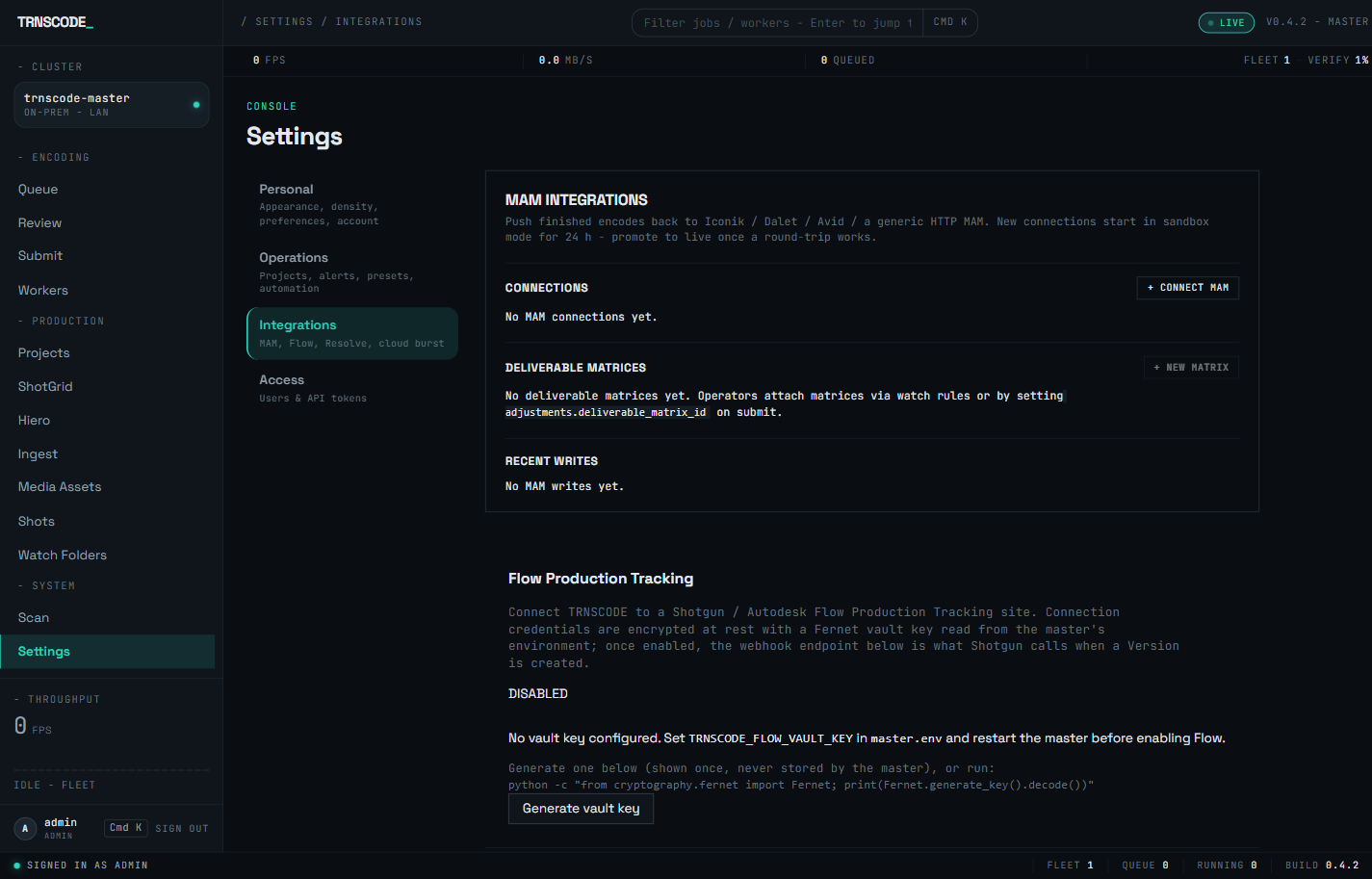
| Integrations | /settings/integrations | MAM, Flow setup and connections, Cloud Burst. |
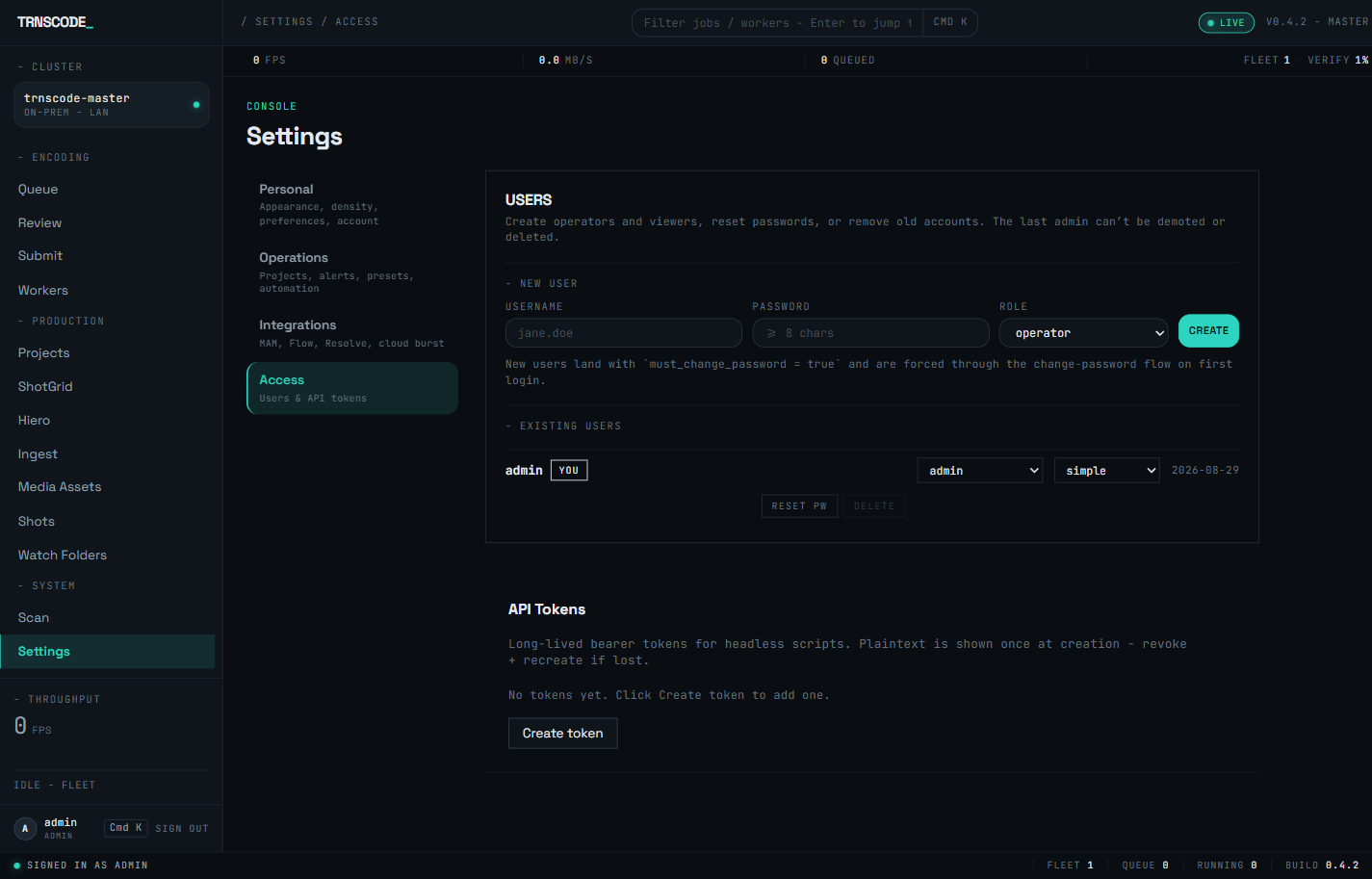
| Access | /settings/access | User accounts, API tokens. |
General holds the personal settings — the settings rail labels it Personal. Its panels are documented where their subjects are: the theme picker in Themes & appearance, the Licensing panel in Licensing, and the Notifications panel in Notifications.
Operations gathers the panels that shape day-to-day encoding: alert channels (webhook, Slack and email notifications for job and worker events), the preset editor with its live FFmpeg command preview, and — further down the page — recurring jobs and job templates.
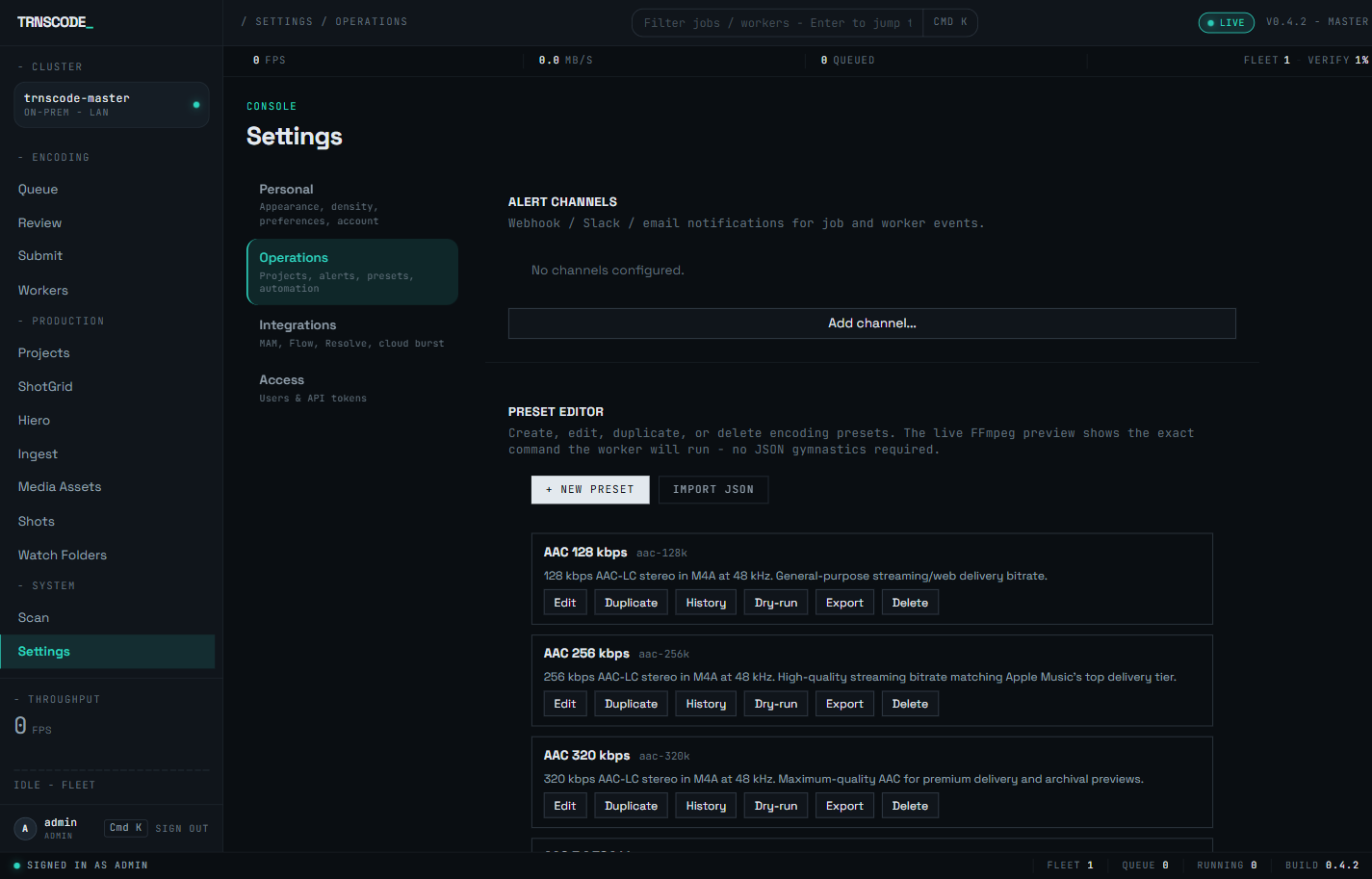
Integrations holds the MAM panel — connections, deliverable matrices and recent writes — the Flow Production Tracking panel, and Cloud Burst. Saving a MAM or Flow connection requires the matching vault key from Integrations and vault keys; the Flow panel reports itself disabled until TRNSCODE_FLOW_VAULT_KEY is set.
Access is where administrators create operator and viewer accounts, reset passwords, and issue API tokens for headless use of the REST API. A new user is forced through a password change on first sign-in, and a token's plaintext is shown once, at creation.
Two panels from the earlier single-page Settings were removed: the AI selector and the Resolve database panel. Watch-folder management moved out of Settings to its own page at /watch-folders — see Watch folders.
Environment variable naming#
Each variable name is the setting name in upper case, preceded by a service prefix:
| Service | Prefix | Example |
|---|---|---|
| Master | TRNSCODE_ | The log_level setting is read from TRNSCODE_LOG_LEVEL |
| Worker | TRNSCODE_WORKER_ | The worker's log_level setting is read from TRNSCODE_WORKER_LOG_LEVEL |
Unrecognized variable names are ignored without an error or a log entry, with one exception: a TRNSCODE_MASTER_-prefixed name outside the three recognized tooling-path variables is flagged with a single warning at master startup. If a setting does not take effect after a restart, verify the prefix and spelling of the variable before investigating further.
Two naming errors account for most misconfigurations:
- A worker variable placed in
master.env, or a master variable placed inworker.env. Each service reads only variables carrying its own prefix. - Variables named
TRNSCODE_MASTER_<NAME>. Master settings use theTRNSCODE_prefix alone; theMASTER_segment is not part of any setting name.
Three variables are exceptions to the prefix rule. They are read directly by the tooling resolvers and are the only supported names of this form:
TRNSCODE_MASTER_OIIOTOOL_PATHTRNSCODE_MASTER_OCIOBAKELUT_PATHTRNSCODE_MASTER_OCIO_CONFIG_PATH
Environment file resolution order#
Both executables load their environment file automatically. Three locations are read in order, and later locations override earlier ones:
| Order | Location |
|---|---|
| 1 | master.env in the current working directory |
| 2 | master.env beside the executable |
| 3 | The path in $TRNSCODE_ENV_FILE |
This order allows a master.env placed beside the executable to be loaded when the executable is launched directly, with no launcher script. The worker resolves worker.env the same way.
Master — listening#
| Variable | Default | Purpose |
|---|---|---|
TRNSCODE_HOST | 0.0.0.0 | Interface for the web interface and REST API. 0.0.0.0 accepts connections from the network; 127.0.0.1 restricts to the local machine. |
TRNSCODE_PORT | 7443 | Port for browser connections to the web interface. |
TRNSCODE_GRPC_HOST | 0.0.0.0 | Interface workers connect to. |
TRNSCODE_GRPC_PORT | 7444 | Worker control channel port. The REST / web port is 7443. |
TRNSCODE_GRPC_ENABLED | true | Set to false to run the web interface with no fleet, for example to review history on a machine that must not accept workers. |
Master — storage#
Where jobs, chunks, workers, presets and audit history are stored. The bundled default is a SQLite file inside the bundle folder, which is appropriate for a single master.
The parent directory is created if it does not exist, so any writable path is accepted. This file is the backup target for the deployment. Use master backup rather than copying the file while the service is running.
Master — authentication#
Signs the session tokens the web interface issues. Anyone who holds this value can create a valid administrator session, so treat the file containing it as a credential.
Username for the bootstrap administrator account.
Used only on first run, to create the administrator account. Changing it afterwards does not change the stored password; use master reset-admin-password for that.
Master — fleet policy#
A shared secret every worker must present to register. An empty value enables open enrollment: any machine that can reach the port may register and wait for approval. Open enrollment is acceptable on an isolated network and is not acceptable on a shared one.
When false, the master refuses any worker whose link is Wi-Fi, cellular or sub-gigabit ethernet. Set true to admit them; each admission is logged as a warning so the override stays auditable.
Advertises the master on the local network so workers locate it without configuration. Disable it on networks where broadcast traffic is not permitted, and set each worker's master address directly instead.
Master — logging#
| Variable | Default | Purpose |
|---|---|---|
TRNSCODE_LOG_LEVEL | INFO | Verbosity. Set DEBUG when diagnosing a problem. |
TRNSCODE_LOG_JSON | false | Emits structured JSON instead of human-readable lines. Enable it when shipping logs to a collector. |
TRNSCODE_LOG_FILE | <state-dir>/master.log | Path of the durable log file. Every domain log line is written here as JSON — in addition to the console, and surviving a hidden console window — with secrets redacted. This is the file to attach to a support request. The default sits in a .trnscode-master directory beside the executable. |
Worker — discovery#
Skips discovery and connects to this address directly. Set it when the worker is on a different subnet from the master, or where mDNS is blocked.
Required when the master sets an enrollment token. Must match exactly.
Pins the master's certificate fingerprint so the worker refuses any other endpoint. When unset, the worker trusts the first master it contacts, which is acceptable on a controlled network and weak on an uncontrolled one.
Worker — runtime#
| Variable | Default | Purpose |
|---|---|---|
TRNSCODE_WORKER_FFMPEG_BINARY | bundled | Uses a host-installed FFmpeg instead of the tested build in bin/. See the warning below. |
TRNSCODE_WORKER_HEARTBEAT_SECONDS | 5 | Interval at which the worker reports its status. Longer intervals delay detection of a failed worker. |
TRNSCODE_WORKER_RECONNECT_INITIAL_SECONDS | 1.0 | Initial retry delay after losing the connection to the master. |
TRNSCODE_WORKER_RECONNECT_MAX_SECONDS | 60.0 | Ceiling for the backoff between reconnection attempts. |
TRNSCODE_WORKER_HEALTH_HOST | 127.0.0.1 | Interface for the local health endpoint. |
TRNSCODE_WORKER_HEALTH_PORT | 9443 | Port for the local health endpoint. |
TRNSCODE_WORKER_LOG_LEVEL | INFO | Verbosity. |
TRNSCODE_WORKER_LOG_JSON | false | Structured JSON output. |
Every bundle ships the same tested FFmpeg so that all workers produce identical output from identical arguments. Pointing one worker at a different build breaks that guarantee, and the resulting inconsistency appears inside a finished file rather than as an error. Change TRNSCODE_WORKER_FFMPEG_BINARY only for a specific, documented reason, and apply the same change across the entire fleet.
Integrations and vault keys#
Credentials for external systems are encrypted at rest, and the key that encrypts them is environment-only — it is never stored in the database. When the key is not set, the master refuses to save a connection rather than store a secret it cannot protect.
Encrypts Flow Production Tracking script keys. Saving a Flow connection fails without it.
Encrypts MAM credentials. Required before any MAM connection can be saved.
Exposes the Flow surface. Disabled by default; the Flow routes answer 503 until it is enabled. It can also be switched on at runtime with POST /system/flow:enable, without a restart.
The externally reachable base URL. Behind a reverse proxy, the Flow webhook URL is built from this value. Without it, the master advertises an address that is not reachable from outside the network.
Overrides the LAN address workers dial for master-mediated transfer. Set it when the address the master detects is not the one workers can route to.
Image, colour and font tooling#
All of these tools ship inside the master executable, so a standard installation requires none of them. Set them only when the deployment must use a site-provided build.
| Variable | Overrides |
|---|---|
TRNSCODE_MASTER_OIIOTOOL_PATH | The bundled OpenImageIO tool used by the EXR paths. |
TRNSCODE_MASTER_OCIOBAKELUT_PATH | The bundled LUT baker. |
TRNSCODE_MASTER_OCIO_CONFIG_PATH | The bundled ACES studio config. |
TRNSCODE_BURNIN_FONT_PATH | The bundled burn-in and slate font. |
Burn-in renders on the worker, not the master. When overriding the font on a fleet, use a path on shared storage that every worker can read; a path that resolves only on the master produces jobs that fail on every other machine. Single-host installations require no setting, because the font ships in the executable.
Run master probe-v-deps to see which of these resolve and where.
Security and confinement#
Confines the file browser and source-preview endpoints to the listed directories. The value is a JSON array of absolute paths; a bare path that is not wrapped in [ ] aborts startup with a configuration error. Unset means unrestricted, a default intended for single-user lab deployments — the master logs a warning at startup while it is unset.
Allows the route that writes directly to a Resolve project database. Disabled by default and opt-in by design — see NLE round-trip.
Behaviour and housekeeping#
| Variable | Default | Effect |
|---|---|---|
TRNSCODE_RUN_BACKGROUND_SERVICES | on | Background timers: rollups, watch folders and reapers. Disabling it stops watch-folder processing. |
TRNSCODE_CAPTIONS_PREFLIGHT_STRICT | off | Fails a job when embedded captions are lost, rather than reporting the loss. See Correctness & QC. |
TRNSCODE_LOCALIZATION_ASSETS_DIR | ./data/localization-assets | Where uploaded dub and subtitle assets are staged. |
TRNSCODE_LOCALIZATION_ASSET_TTL_DAYS | 30 | Retention period for unreferenced localization assets. |
Scheduled backups#
The master can take periodic online backups of its database. The schedule and retention are set in the console under Settings → Operations → Backups; the environment variables below only seed that panel's defaults, and the values saved in the panel win at runtime. The full workflow — the verified archive format, listing and downloading a backup, and restoring one — is on the Backups page.
| Variable | Default | Effect |
|---|---|---|
TRNSCODE_BACKUP_ENABLED_DEFAULT | false | Whether scheduled backups start on. Off by default, because the default destination sits on the same volume as the database. |
TRNSCODE_BACKUP_INTERVAL_HOURS_DEFAULT | 24 | How often a backup is due. |
TRNSCODE_BACKUP_KEEP_LAST_DEFAULT | 7 | How many archives to retain; older ones are pruned. |
TRNSCODE_BACKUP_DESTINATION | <db-parent>/backups-scheduled | Where archives are written. Choose a different volume for real protection against a disk failure. |
TRNSCODE_BACKUP_MIN_FREE_BYTES | 1073741824 | Free-space floor for the pre-write preflight (1 GiB). A backup refuses unless the volume has 2 × (db + wal) + this many bytes free. |
TRNSCODE_BACKUP_POLL_INTERVAL_SECONDS | 300 | How often the service checks whether a backup is due — not the schedule itself. |
Applying changes#
Environment-file settings are read at startup. Edit the file, then restart the affected service: the master for master settings, the relevant worker for worker settings. Changing a master fleet-policy setting does not retroactively admit workers that were already refused; they must attempt registration again.